A powerful Web3 wallet for every crypto lifestyle
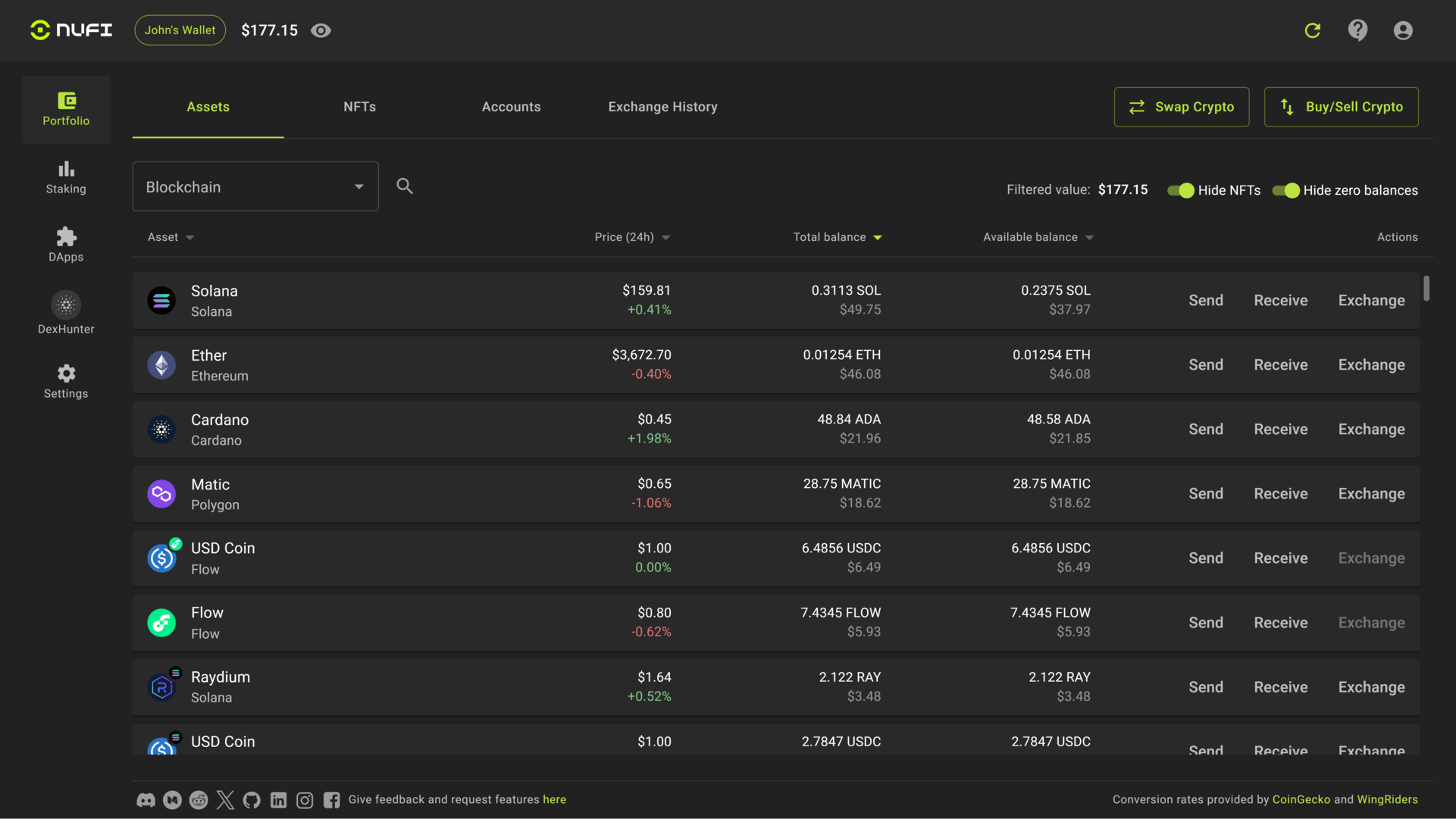
NuFi Wallet Features:

Multi-chain portfolio
Manage your assets and accounts on different blockchains together.

Multi-chain staking
Stake crypto, earn crypto while you sleep. Learn more about staking here.

Multi-chain NFT gallery
Manage your NFTs on different blockchains together in one gallery.

Stress-free seedless signup
Log in with a social account like Google to have a non-custodial wallet created for you with no seed phrase to store. Learn more.

Connect to Web3 Dapps
Connect to Dapps like NFT marketplaces, DExes, DeFi, Metaverses and more on different chains at the same time.

Compatible with all Dapps
Connect to Dapps even if they don't support NuFi wallet directly thanks to Wallet Emulation mode. Learn more.

Buy and trade 400+ assets
Integrated crypto exchange and option to buy crypto with card.

Integrated Cardano DEX
Swap tokens on the Cardano blockchain directly in your wallet.

Effortless Migration
Import your existing crypto wallet in under 30 seconds. Learn more here.
Sync your hardware wallet in minutes
Secure your crypto with the industry's leading hardware wallets
Download and install NuFi Desktop
Get the latest version of NuFi Desktop from our official download page.
Connect your hardware wallet
Connect your Ledger/Trezor/etc. via USB and open the relevant app (e.g., Cardano/Ethereum).
Add Hardware Wallet in NuFi Desktop
In NuFi Desktop: Add Hardware Wallet → Select device → Authorize connection.
Enable transactions
Portfolio loads in read-only; enable transactions by confirming on your device.
NuFi will never ask for your seed phrase.
Confirm addresses and transactions on your device screen.
All token/airdrop visibility is inside the app; avoid web popups or DM links.
About the Glaciers drop of $NIGHT
Token Visibility
If you are eligible for the Glaciers drop of $NIGHT, it will appear in NuFi Desktop after syncing supported accounts. Distribution visibility and any actions occur inside the app. There is no website-based claiming flow.
Important: Eligibility and details are provided by the official program. NuFi does not request seed phrases or off-app signatures. Always verify actions on your hardware device screen.
Security you can trust
Built with industry-leading security practices and complete transparency
Non-custodial by design
Your private keys never leave your device. NuFi operates on a non-custodial model, ensuring you have complete ownership and control over your digital assets.
Your keys, your crypto
Non-custodial architecture means you maintain complete control over your private keys and funds.
Hardware wallet integration
Industry-leading security with support for Ledger, Trezor, and other trusted hardware wallets.
Open documentation
Transparent development with publicly available documentation and security practices.
Transparent permissions
Clear visibility into what data the app accesses and how your information is handled.
Security Checklist
Download NuFi Desktop
Get the latest version of NuFi Desktop for your operating system
Windows
NuFi-Desktop-Windows.exe
142 MB
SHA256 Checksum:
sha256: a1b2c3d4e5f6g7h8i9j0k1l2m3n4o5p6q7r8s9t0u1v2w3x4y5z6
macOS
NuFi-Desktop-macOS.dmg
156 MB
SHA256 Checksum:
sha256: z9y8x7w6v5u4t3s2r1q0p9o8n7m6l5k4j3i2h1g0f9e8d7c6b5a4
Linux
NuFi-Desktop-Linux.AppImage
164 MB
SHA256 Checksum:
sha256: m5n6o7p8q9r0s1t2u3v4w5x6y7z8a9b0c1d2e3f4g5h6i7j8k9l0
Installation Instructions
Follow these steps to install NuFi Desktop on your system
- 1Download the appropriate installer for your operating system
- 2Verify the SHA256 checksum matches the provided hash
- 3Run the installer and follow the setup instructions
- 4Launch NuFi Desktop from your applications folder
- 5Click 'Add Wallet' to get started
- 6Select 'Hardware Wallet' to connect your device
- 7Verify all addresses on your hardware device screen
Frequently asked questions
Get answers to common questions about NuFi Desktop and hardware wallet integration
Can I claim $NIGHT tokens on this website?
No, there is no claiming process available on this website. If you are eligible for the Glaciers drop of $NIGHT, it will appear automatically inside NuFi Desktop after syncing your supported accounts. All token visibility and any related actions occur exclusively within the NuFi Desktop application.
Will NuFi ever ask for my seed phrase?
Never. NuFi operates on a non-custodial model and will never ask for your seed phrase, private keys, or request you to sign unrelated transactions. Your seed phrase should only be entered directly into your hardware wallet or used for wallet recovery in secure, offline environments.
Which hardware wallets are supported?
NuFi Desktop supports Ledger, Trezor, Grid+, Keystone, OneKey, and BitBox hardware wallets. Simply connect your device via USB, open the relevant app on your hardware wallet (e.g., Cardano app for ADA transactions), and follow the connection process in NuFi Desktop.
Is NuFi Desktop safe to download?
Yes, when downloaded from official sources. Always download NuFi Desktop only from nu.fi or official app stores. Verify the SHA256 checksum provided with each download to ensure file integrity. Be wary of impostor sites or unofficial download sources.
What blockchains does NuFi support?
NuFi is a multichain wallet supporting multiple blockchain networks. The exact list of supported chains is regularly updated and can be found in the app's documentation. Popular networks include Cardano, Ethereum, and other major blockchain ecosystems.
Where can I get help if I have issues?
For support, you can access our Knowledge Base for self-help articles, join our Discord community for real-time assistance, or contact us directly via email. All official support channels are linked in the footer of this page and within the NuFi Desktop application.